
Permissions Model
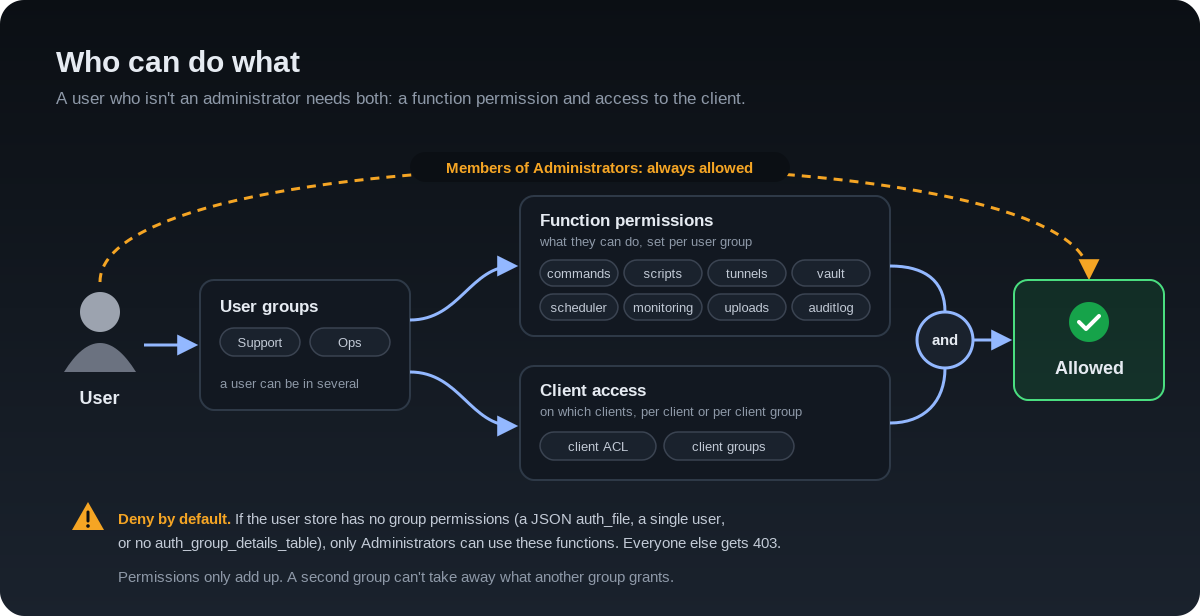
Members of the ‘Administrators’ user group bypass the below permission model completely. They have full access to all hosts and all functions.
A user who isn’t an administrator has no rights in Procy until at least one of their user groups grants permissions. Procy has the following functions:
- tunnels
- scripts
- commands
- vault
- scheduler
- monitoring
- uploads
- auditlog
The permissions are stored in the group_details table of
your API access database. They are managed through
the update user groups API endpoint.
Without agroup_detailstable (auth_group_details_table), for example with a JSONauth_fileor a single user, permissions can’t be evaluated. In that case only members ofAdministratorscan use these functions; other users get “403 Forbidden”.rportdlogs a notice about this at startup. To give other users rights, store users in a database with agroup_detailstable.
In addition to one of the above function permissions, client permissions are needed. The function permissions define only what a user can do, not on which clients they can do it.
There is no option to revoke a permission. Once a user group has a permission, you cannot revoke it through a second user group.
A user with function permissions also needs access to at least one client to use Procy.
You can grant access to a single client to one or many user groups. The allowed user groups are stored on the clients’
table inside the details object. The so-called client ACLs are managed through
the client ACL API endpoint.
You can grant access to a client group to one or many user groups. This makes managing access rights effective and flexible.
Client group access is managed through
the client groups API endpoint. The underlying data is stored on
the client_groups database. See client groups.
There is no option to revoke a permission. If permission is granted to client group A, you cannot deny access to client group B if it is a subset of A.