
Pairing clients
rport with the right server address, fingerprint and credentials. The pairing
service is built into rportd; it’s what the “Install client” dialog of the web UI uses.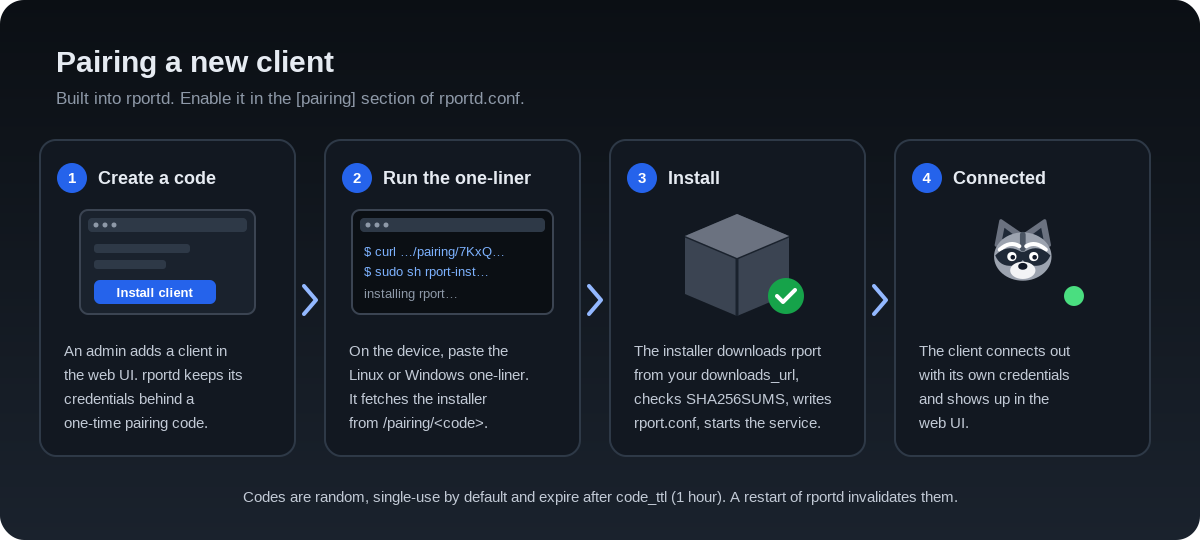
Add a [pairing] section to /etc/rport/rportd.conf:
[pairing]
  enabled = true
  ## Public base URL of rportd used in the one-liners. Defaults to api.base_url,
  ## and without that to the scheme and host of each request.
  url = "https://procy.example.com"
  ## Where the installer downloads the client packages from. Required.
  downloads_url = "https://procy.example.com/downloads"
  ## How long a code stays valid. Defaults to 1h.
  #code_ttl = "1h"
  ## A code is invalidated by its first successful download. Set to true to allow reuse until it expires.
  #allow_code_reuse = false
Restart the server with sudo systemctl restart rportd.service.
When pairing is enabled, rportd serves these routes next to the API:
| Route | Access | Returns |
|---|---|---|
POST /pairing | API administrators | a pairing code and the Linux and Windows one-liners |
GET /pairing/<code> | anyone with the code | the installer: PowerShell for PowerShell clients, shell otherwise |
GET /pairing/update | anyone | the client update script |
The status API reports <url>/pairing as pairing_url, so the web UI finds it
without further setup. [server] pairing_url points the web UI at an external pairing service instead; it’s ignored
while the built-in one is enabled.
The installer doesn’t download from GitHub. It expects the client packages under downloads_url in this layout:
<downloads_url>/rport/stable/VERSION
<downloads_url>/rport/stable/SHA256SUMS
<downloads_url>/rport/stable/rport_linux_<arch>.tar.gz
<downloads_url>/rport/stable/rport_windows_x86_64.zip
VERSION holds the version number, and SHA256SUMS the checksums of the archives; the installer stops if a
download doesn’t match. Any static web server works, for example a folder under the doc_root of rportd. Without
downloads_url the generated scripts refuse to run.
In the web UI, open “Install client”. The UI deposits the new client’s credentials with POST /pairing and shows
the one-liners. On Linux:
curl https://procy.example.com/pairing/<code> > rport-installer.sh
sudo sh rport-installer.sh
On Windows, in PowerShell as Administrator:
[Net.ServicePointManager]::SecurityProtocol = [Net.SecurityProtocolType]::Tls12
$url="https://procy.example.com/pairing/<code>"
Invoke-WebRequest -Uri $url -OutFile "rport-installer.ps1"
powershell -ExecutionPolicy Bypass -File .\rport-installer.ps1
The installer downloads and verifies the client, writes rport.conf, and installs and starts the service. The new
client then connects and appears in the web UI.
You can also create a code through the API. It needs an administrator and client credentials that the server accepts,
for example ones created with the /clients-auth endpoint:
curl -s -u admin:$PASSWORD https://procy.example.com/pairing \
  -H "Content-Type: application/json" \
  --data-raw '{
    "connect_url": "http://procy.example.com:8080",
    "fingerprint": "<FINGERPRINT>",
    "client_id": "client7",
    "password": "<CLIENT_PASSWORD>"
  }' | jq
The response holds pairing_code, expires and the one-liners in installers.linux and installers.windows.
GET /pairing/update returns the client update script: a shell script for curl/wget and PowerShell for
Invoke-WebRequest. Run it as root (Linux) or as an administrator (Windows), on the machine or as a remote command
from the web UI:
curl -fsS https://procy.example.com/pairing/update -o rport-update.sh && sudo sh rport-update.sh -n -m
Invoke-WebRequest -UseBasicParsing https://procy.example.com/pairing/update -OutFile rport-update.ps1
powershell -ExecutionPolicy Bypass -File .\rport-update.ps1 -m
The update is supervised, so a failed update does not leave a machine unreachable:
- The script downloads the latest client from
downloads_url, verifies it againstSHA256SUMSand backs up the current binary andrport.conf. - A supervisor, started detached from the client (a
systemd-rununit on Linux, a scheduled task or WMI process running as SYSTEM on Windows), stops the client, installs the new version and starts it again. - The new client must log a connection to the server within 120 seconds and keep running for 20 more. If it does not, the supervisor restores the previous binary and config and restarts the client.
When the script runs as a remote command, it returns as soon as the supervisor has started; the client restarts a few
seconds later. The outcome is written to /var/lib/rport-update/status.json on Linux and
C:\Program Files\rport\update\status.json on Windows, next to an update.log. Windows also logs to the
Application event log (source rport-update). status is success, rolled_back or rollback_failed.
Use -t for the unstable channel. To install a specific package, pass -z <url or file> on Linux (tar.gz, deb or
rpm; set PKG_SHA256 to verify it) or -pkgUrl <url or file> on Windows.
Windows versions before Windows 11 and Server 2022 cannot use TLS 1.3. Keeptls_minin[api]at its default,"1.2", if you have such clients; with"1.3"they cannot download the installer, the update script or the client.
- A pairing code gives access to the client credentials embedded in the installer. Codes are 20 random characters,
single-use by default and expire after
code_ttl. - Codes are kept in memory. Restarting
rportdinvalidates all open codes. - Failed code lookups are rate-limited per IP address, and the responses are not cached.
- Serve
rportd, and therefore the pairing routes, over HTTPS.