
Procy
Procy continues the open-source rport project, originally built by CloudRadar and carried on by the community as OpenRPort after rport moved to a commercial licence. The programs, packages and config files still use the
rportnames (rportd,rport,/etc/rport/rportd.conf); they will be renamed in a later release.
Procy helps you manage remote servers without the hassle of VPNs, chained SSH connections, jump hosts, or commercial tools like TeamViewer and its clones.
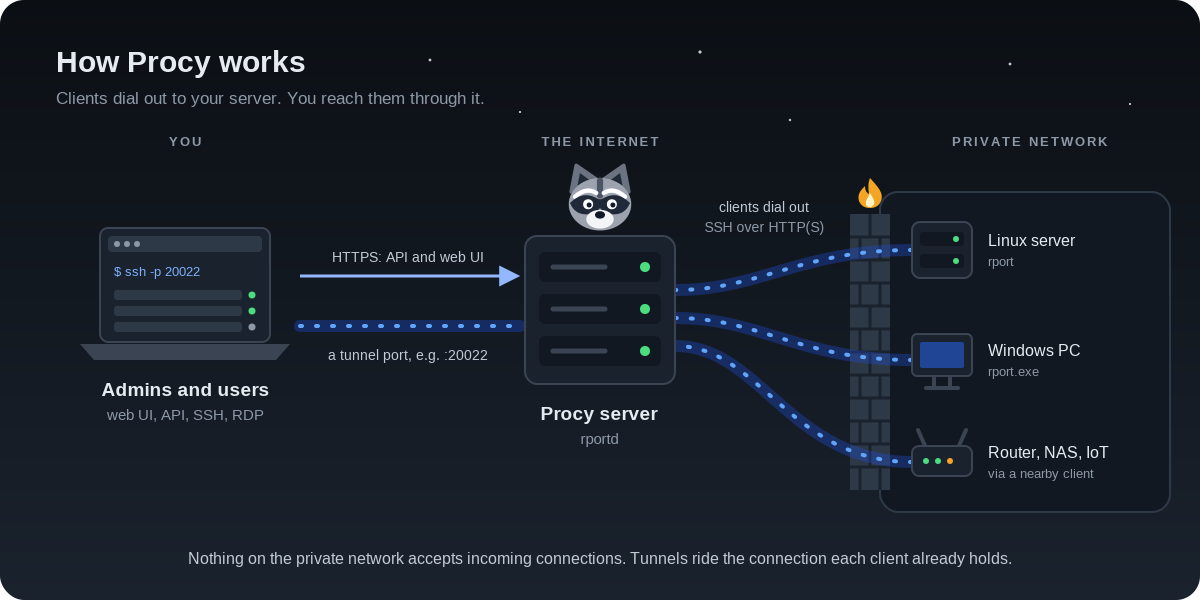
Procy consists of a server (rportd) and a client (rport) that establish permanent or on-demand secure tunnels to
devices inside protected intranets behind a firewall.
All operating systems provide secure and well-established mechanisms for remote management, SSH and Remote Desktop being the most widely used. Procy makes them accessible easily and securely.
Is Procy a replacement for TeamViewer? Yes and no. It depends on your needs. TeamViewer and a couple of similar products are focused on giving access to a remote graphical desktop bypassing the Remote Desktop implementation of Microsoft. They fall short in a heterogeneous environment where access to headless Linux machines is needed. But they are without alternatives for Windows Home Editions. Apart from remote management, they offer supplementary services like video conferences, desktop sharing, screen mirroring, or spontaneous remote assistance for desktop users.
Goal of Procy Procy focuses only on remote management of those operating systems where an existing login mechanism can be used. It can be used for Linux and Windows, but also appliances and IoT devices providing a web-based configuration. From a technological perspective, Ngrok and openport.io are similar products. Procy differs from them in many aspects.
- Procy is 100% open source. Client and Server. Remote management is a matter of trust and security. Procy is fully transparent.
- Procy comes with a web UI that makes managing remote systems easy.
- Procy is made for all operating systems with native and small binaries. No need for Python or similar heavyweights.
- Procy lets you self-host the server.
- Procy lets clients wait in standby mode without an active tunnel. Tunnels can be requested on demand by the user remotely.
Supported operating systems For the client almost all operating systems are supported, and we provide binaries for a variety of Linux architectures and Microsoft Windows. Also, the server can run on any operating system supported by the golang compiler. At the moment we provide server binaries only for Linux X64 because this is the ideal platform for running it securely and cost-effective.
Every project needs a mascot, and ours is a raccoon: good with its hands, busy at night, and very good at getting into places it was never meant to reach. That is the job of a remote tunnel.
The first name on the table was Cannie. It sounds like canny, which is exactly what a raccoon is, and it also sounds like can, the garbage can every raccoon knows how to open. Unfortunately, half the internet had the same idea.
So we went to Latin. The raccoon’s genus is Procyon, and callidus means clever or skilled: Procyon callidus, the clever raccoon. As a bonus, Procyon is also the brightest star in Canis Minor, so a little of Cannie lives on in the night sky.
Procyon callidus is a mouthful, so it became Procy (say “PRO-see”). It sounds a lot like proxy, which for a tunnel and remote access tool we decided is a feature, not a bug.
Download the server and client packages from the latest release, then follow the quick start.
Pairing (the “Install client” one-liners in the web UI) is built into rportd. Enable it in /etc/rport/rportd.conf:
[pairing]
  enabled = true
  url = "https://procy.example.com"
  downloads_url = "https://procy.example.com/downloads"
and restart the server: sudo systemctl restart rportd.service. See
pairing clients for how to serve the client packages and all options.
The documentation covers installation, configuration, secure operation and the concepts behind Procy. The REST API is described in the API reference.
We need your feedback. Our vision is to establish Procy as a serious alternative to all the black box software for remote management. To make it a success, please share your feedback.
If you encounter errors while installing or using Procy, please let us know. File an issue report here on GitHub.
If you have difficulties installing or using Procy, don’t hesitate to ask us anything. Often questions give us a hint on how to improve the documentation. Do not use issue reports for asking questions. Use the discussion forum instead.
Please share positive feedback also. Give us a star. Write a review. Share our project page on your social media. Contribute to the discussion. Is Procy suitable for your needs? What is missing?
Click on the Watch button in the top right corner of the Repository Page. This way you won’t miss any updates and the upcoming features.
- Thanks to jpillora/chisel for the great groundwork of tunnels
Procy uses <major>.<minor>.<buildnumber> version pattern for compatibility with a maximum number of package managers.